Your Google Business Profile just got suspended, and your phone has gone quiet. No calls, no direction requests, no new customers finding you on Maps. For small business owners in Orlando, this is a serious problem — and every day without a fix costs you real money.
If you're dealing with a suspended profile right now, REK Marketing and Design can help you get it back up and ranking. Call (407) 500-0102 for a free consultation.
This guide walks you through exactly what causes suspensions, how to fix them, and how to prevent it from happening again.
What Does a Google Business Profile Suspension Actually Mean?
A suspension means Google has removed your profile from Maps and local search results. Your listing still exists in Google's system, but customers can't find it. There are two types you need to know about:
Soft suspension: Your profile is unverified and hidden, but you can still access your dashboard. This is often triggered by an edit that flagged Google's system.
Hard suspension: Your profile is fully removed, and you may not be able to access your dashboard at all. This is more serious and happens when Google believes your listing violates their guidelines.
The distinction matters because the fix is different for each. A soft suspension usually resolves with re-verification. A hard suspension requires a formal appeal with documentation.
What Are the Most Common Reasons Google Suspends a Profile?
Google suspends profiles for a handful of repeat offenders. Knowing which one applies to you is the first step toward getting reinstated.
Misleading business information is the top culprit. This includes keyword-stuffed business names (adding "Orlando" or "best" to your actual business name), incorrect categories, or service areas that don't match your actual operations.
Address issues are especially common for service-area businesses here in Central Florida. If you set a physical address for a business that actually serves customers at their location — like a plumber, electrician, or mobile detailing service — Google may flag or suspend your listing. Service-area businesses should hide their address and set service areas instead.
Multiple listings for the same business location also trigger suspensions. We've seen this happen often when a business moves locations but never removes the old profile.
Guideline violations cover a wide range, from using a P.O. box as your business address to listing a virtual office in Dr. Phillips or Lake Nona without a real staffed presence there.
How Do You Check Your Suspension Type and Start the Fix?
Start by logging into your Google Business Profile dashboard at business.google.com. If you see a "Suspended" badge, check whether you can still access your profile settings. If you can, that's a soft suspension. If your access is fully blocked, you're dealing with a hard suspension.
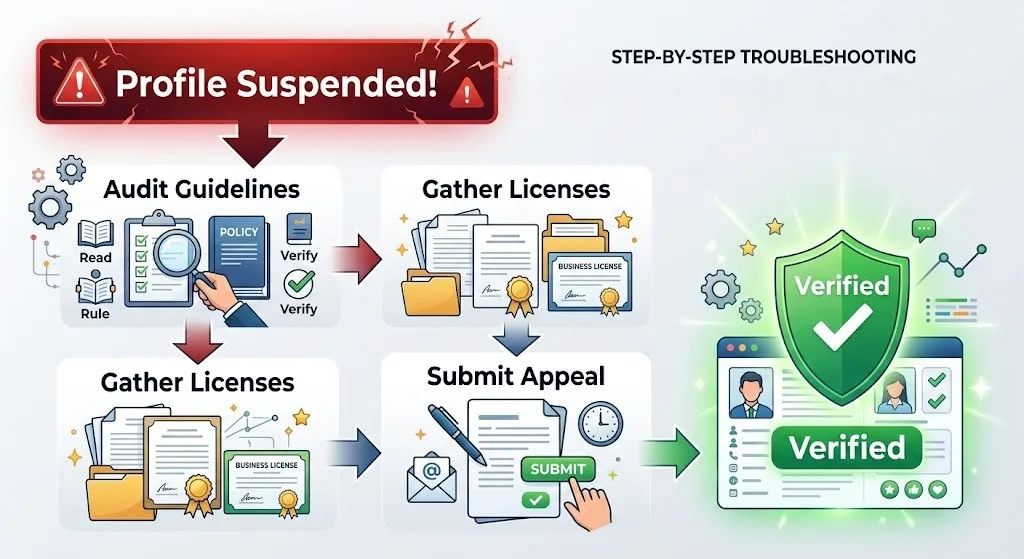
Before you file anything, read through Google's Business Profile guidelines carefully. Look for any recent edits you or someone on your team may have made. A category change, a name update, or even a new phone number can trigger a review.
Once you've identified the likely cause, correct the violation in your profile. Don't submit an appeal without fixing the underlying issue first. Google reviewers will check, and a second denial makes reinstatement harder.
How Do You Submit a Google Business Profile Reinstatement Appeal?
The appeal process has a few critical steps. Follow them in order and don't skip any:
Step 1: Fix the violation. Update your business name, address, category, or whatever triggered the suspension. Make sure everything matches your website, state business registration, and any other online directories.
Step 2: Gather your documentation. Google will ask for proof that your business is legitimate. This typically includes:
- A utility bill or lease agreement showing your business address
- Your state business license or LLC registration
- Photos of your storefront, signage, or work vehicles
- Any business bank statements or tax documents that confirm your business name and address
Step 3: Go to the Business Profile Help page and search for the reinstatement request form. Fill it out completely. Vague answers get denied.
Step 4: Wait. Google's review process typically takes 3 to 14 business days. Submitting multiple appeals won't speed things up; it can actually slow them down.
Step 5: Follow up if needed. If your appeal is denied, you can request a second review. This is where having detailed documentation and a clear explanation of the changes you made gives you the best shot.
Why Does a Suspended Profile Hurt Your Local SEO So Much?
For Orlando service businesses, your Google Business Profile is where most of your local leads come from. When it's suspended, you disappear from the Map Pack entirely. You won't show up in the top three local results that appear above organic listings. You won't appear in AI Overviews when someone asks Google to recommend a business near them.
Here's what that means in real numbers: businesses with optimized, active profiles get 5x more views than incomplete or inactive ones. And 70% of customers visit a business within 5 miles of their search location. If you're a roofing company in Winter Park or an HVAC contractor serving the Thornton Park area, those map results are your lifeline. A suspension cuts that off entirely until you get reinstated.
Your Google Business Profile management has a direct impact on how you rank in the Map Pack — and increasingly, how AI-powered search tools like Google's AI Overviews recommend your business to nearby customers.
How Do You Prevent a Future Google Business Profile Suspension?
Once you're reinstated, keeping your profile clean is straightforward if you follow a few consistent habits.
Keep your NAP data consistent. Your business name, address, and phone number should be identical across your website, your GBP, and every other online directory. Even small differences — like "Ave" vs. "Avenue" — can create trust issues with Google over time.
Don't keyword-stuff your business name. Your GBP name should match the name on your storefront, business registration, and invoices. Nothing more. Adding location terms or service keywords to your name is a violation and a fast track back to suspension.
Use the correct business category. Your primary category carries the most weight for ranking. Choose the most specific, accurate option available. If you're a general contractor in the Dr. Phillips area, listing yourself under a broad "contractor" category when a more specific option exists will hurt both your rankings and your compliance standing.
Add a new photo at least once a month. Active profiles signal to Google that your business is legitimate and operational. Fresh photos, regular posts, and prompt review responses all contribute to this.
Set your service areas correctly. If you're a service-area business, hide your home or office address and list the specific cities or zip codes you serve instead. This is especially relevant for mobile businesses operating across Orange County.
When Should You Call a Local Marketing Expert?
Some suspensions are simple to fix on your own. Others aren't. If your appeal has been denied once, if you're dealing with a hard suspension with no dashboard access, or if you've made multiple edits and still can't identify the violation, it's time to bring in someone who handles this regularly.
We've helped many Orlando small businesses work through the reinstatement process, including cases where the original suspension reason wasn't obvious and where Google's initial denial made the path forward unclear.
The reinstatement process can take anywhere from a few days to several weeks depending on the complexity of your situation. Every week your profile stays suspended is a week you're invisible in local search.
Frequently Asked Questions
How long does Google Business Profile reinstatement take in Florida?
Most reinstatement decisions come back within 3 to 14 business days after submitting a complete appeal with documentation. More complex cases or second reviews can take longer. Submitting incomplete appeals or multiple requests at once tends to slow the process down.
Can a competitor get my Google Business Profile suspended?
Yes. Competitors can flag your profile for guideline violations. If your profile has any legitimate issues, that flag may trigger a suspension. Keeping your profile clean and fully compliant is the best protection.
Does a Google Business Profile suspension affect my website rankings?
A suspension won't directly tank your organic website rankings, but it removes you from Maps and the local Map Pack entirely. Since Map Pack results appear above organic listings for most local searches, losing that visibility has a significant impact on overall traffic and lead volume.
What documentation does Google accept for reinstatement?
Google most commonly accepts: utility bills, lease agreements, business licenses, state registration documents, photos of your business location or signage, and bank statements. Documents should clearly show your business name and address matching your GBP listing.
Get Your Profile Back Online
A suspended Google Business Profile is fixable. The key is identifying the right cause, correcting it before you appeal, and submitting a complete reinstatement request with proper documentation.
If you've already tried and been denied, or if the process feels like a dead end, REK Marketing and Design knows the process well. We work with small business owners across Orlando every day to protect and recover their local search presence. Call us at (407) 500-0102, and we'll take a look at what's going on with your profile.