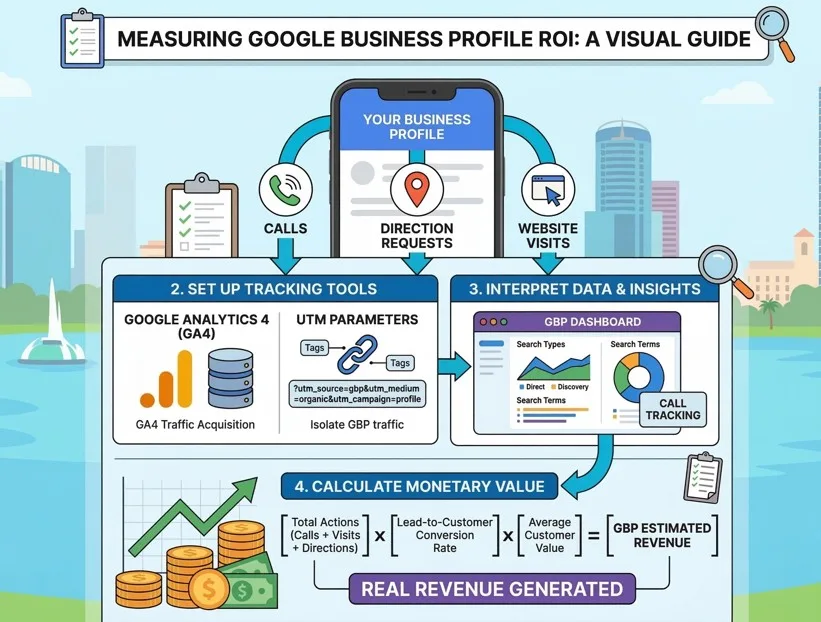
Your Google Business Profile is generating calls, website visits, and direction requests every single day. But if you can't measure those actions and tie them back to real revenue, you're flying blind. For small business owners doing Google Business Profile ROI tracking in Orlando, Florida, this guide walks you through exactly how to set up tracking, interpret your data, and calculate what your profile is actually worth.
Need help setting this up right away? Call REK Marketing and Design at (407) 500-0102 for a free consultation.
Why Does Google Business Profile ROI Actually Matter?
Your GBP drives more leads than most small business owners realize. According to Google, businesses with fully optimized profiles receive 5x more views than incomplete ones. That's not a small difference. For a Dr. Phillips landscaping company or a Thornton Park café, those extra views translate directly into phone calls and foot traffic.
The problem is that most business owners treat their GBP as a set-and-forget listing. They don't know how many customers came from their profile, which means they can't justify spending time or money improving it. Tracking ROI changes that. When you know a single month of profile activity generated 30 leads worth an average of $200 each, you have a clear picture of what's working.
How Do You Connect Google Business Profile to Google Analytics 4?
To measure GBP traffic in GA4, you need to link your profile actions to your website data. Set this up in two steps.
First, go to your Google Business Profile dashboard, select your business, and confirm your website URL is listed correctly. Second, inside GA4, create a new property if you haven't already and install the tracking code on your website. Once both are connected, GA4 will begin recording sessions, events, and conversions that originate from GBP clicks. Look under Acquisition > Traffic Acquisition and filter by the "Organic Google" channel. Sessions that come through your GBP website button will appear there.
This connection is the foundation of everything else. Without it, you're guessing.
What Direct Actions Can You Track Inside GBP Insights?
GBP Insights tracks three high-value actions: website visits, phone calls, and direction requests. Each one tells you something different about buyer intent.
- Website visits show early-stage interest. Someone clicked to learn more.
- Phone calls show high intent. They want to talk to a real person.
- Direction requests show purchase-ready behavior. They're coming to you.
You can find these numbers directly inside your GBP dashboard under the "Performance" tab. Look at a 90-day window for meaningful trends rather than week-to-week noise. A business near Lake Nona's Medical City, for example, might see a spike in direction requests after posting updated hours or photos, which gives you a direct feedback loop between your profile activity and customer behavior.
For deeper call tracking, use a dedicated call tracking number (services like CallRail start around $45/month) that you place only on your GBP. Any call to that number came from your profile. Simple, accurate attribution.
How Do UTM Parameters Help Isolate Your GBP Traffic?
UTM parameters let you tag your GBP website link so GA4 separates that traffic from general organic search visits. Without UTMs, a click from your GBP profile and a click from a Google search result look identical inside Analytics.
Here's the format to use:
https://yourwebsite.com/?utm_source=google&utm_medium=organic&utm_campaign=gbp-profile
Add this tagged URL to the website field in your GBP dashboard. Now, inside GA4, go to Acquisition > Traffic Acquisition and filter by campaign name "gbp-profile." You'll see exactly how many sessions, leads, and conversions came from your profile. This is how accurate Google Business Profile ROI tracking in Orlando, Florida gets done at the business level, not the guess level.
What Do Local Search Insights Tell You About How Customers Find You?
GBP's search insights split your traffic into two categories: direct searches (people who searched your business name) and discovery searches (people who found you while searching for a product or service).
Discovery searches are the metric that matters most for growth. If 70% of your views come from discovery, your profile is showing up for category-level searches like "plumber in Orlando" or "HVAC near me." That means new customers who didn't know your name are finding you.
Pay attention to the specific search terms listed in your Insights panel. If you're a Winter Park electrician and you see "panel upgrade Orlando" driving views, that's a content opportunity. Post a GBP update, add that service to your profile description, and link to a relevant page on your website to reinforce the signal.
Our team works with local businesses across Central Florida, and we consistently see that profiles updated weekly generate 30-40% more discovery impressions than profiles left unchanged for 60+ days.
How Do You Calculate the Monetary Value of Your GBP?
Here's a straightforward formula for estimating ROI:
- Total GBP-driven actions per month (calls + website visits + direction requests)
- Multiply by your lead-to-customer conversion rate (industry average: 10-30%)
- Multiply by your average customer value
Example: A Dr. Phillips pool service company gets 80 actions per month from GBP. Their conversion rate is 20%, producing 16 customers. Their average job is $350. That's $5,600/month in revenue traced back to a free listing.
For Google Business Profile ROI tracking in Orlando, Florida, this calculation puts a real number on something most business owners treat as an afterthought. If professional Google Business Profile management costs $300-$500/month and generates $5,000+ in attributable revenue, the math is clear.
Should You Use AI Overviews to Boost Your GBP Visibility?
Yes, and here's why it matters more than ever. After Google's December 2025 Core Update, AI Overviews now appear for roughly 29% of searches. For local searches, that number is lower, around 7%, which means local businesses have a real advantage when their GBP data is clean and complete.
AI tools like Google's AI Overviews and ChatGPT pull from your GBP when recommending local businesses. A complete profile with consistent NAP (name, address, phone), recent photos, keyword-optimized service descriptions, and a steady stream of reviews sends strong signals to both traditional and AI-powered search.
Three specific steps to optimize for this:
- Write your service descriptions in full sentences that answer common customer questions
- Keep your primary category tightly defined (don't list 10 categories when 2-3 are accurate)
- Respond to every review within 24-48 hours to show active engagement
Combined with a solid local SEO strategy, these actions compound over time. Businesses that rank well organically are the ones most likely to get cited in AI Overviews, and that citation drives visibility even when users don't click through.
Start Making Data-Backed Decisions for Your Business
Google Business Profile ROI tracking in Orlando, Florida doesn't require a marketing degree. It requires the right setup, consistent monitoring, and a clear formula for translating actions into revenue. Once you have that system running, you'll know within 30 days whether your profile is performing or leaving money on the table.
At REK Marketing and Design, we've helped hundreds of small businesses across Central Florida build and track local visibility that actually moves the revenue needle. Call us today at (407) 500-0102 and let's take a look at what your GBP is really doing for your business.